

// guide
Why Playwright MCP Uses So Many Tokens (and How to Fix Context Loss)
Playwright MCP's accessibility snapshots pile up in context turn after turn. We benchmarked where the tokens go, how to trim them, and how Stagehand compares.
Playwright's MCP, initially released in March 2025, provides a native integration with Claude Code, Cursor, OpenClaw and Codex, Playwright MCP to develop exploratory automation, self-healing tests, or long-running autonomous workflows.
However, its architecture built around accessibility tree snapshots is token-consuming, especially in reasoning loops where the context window rapidly increases, turn after turn. As the context of each visited page stays in the context as the agent progresses, the cost grows and agent quickly lose context of the active work after a few navigation steps.
None of this makes Playwright a bad tool. The fact is that Playwright was initially designed for browser testing, not for AI Agents.
How Playwright MCP represents a page to an agent#
While Playwright exposes multiple API to inspect (locator(), screenshot()) and interact (.click(), .fill()) with a webpage, its MCP versions primarily relies on accessibility tree snapshots: each button, link, and input with its role, name, and a reference ID the agent uses to act on it.
This snapshots-based architecture is, in theory, a good fit for agents, as text is cheaper than images and refs more reliable than complex selectors or pixel coordinates.
Here's how your Coding Tool (Codex, Claude Code) or custom agent interacts with Playwright MCP:
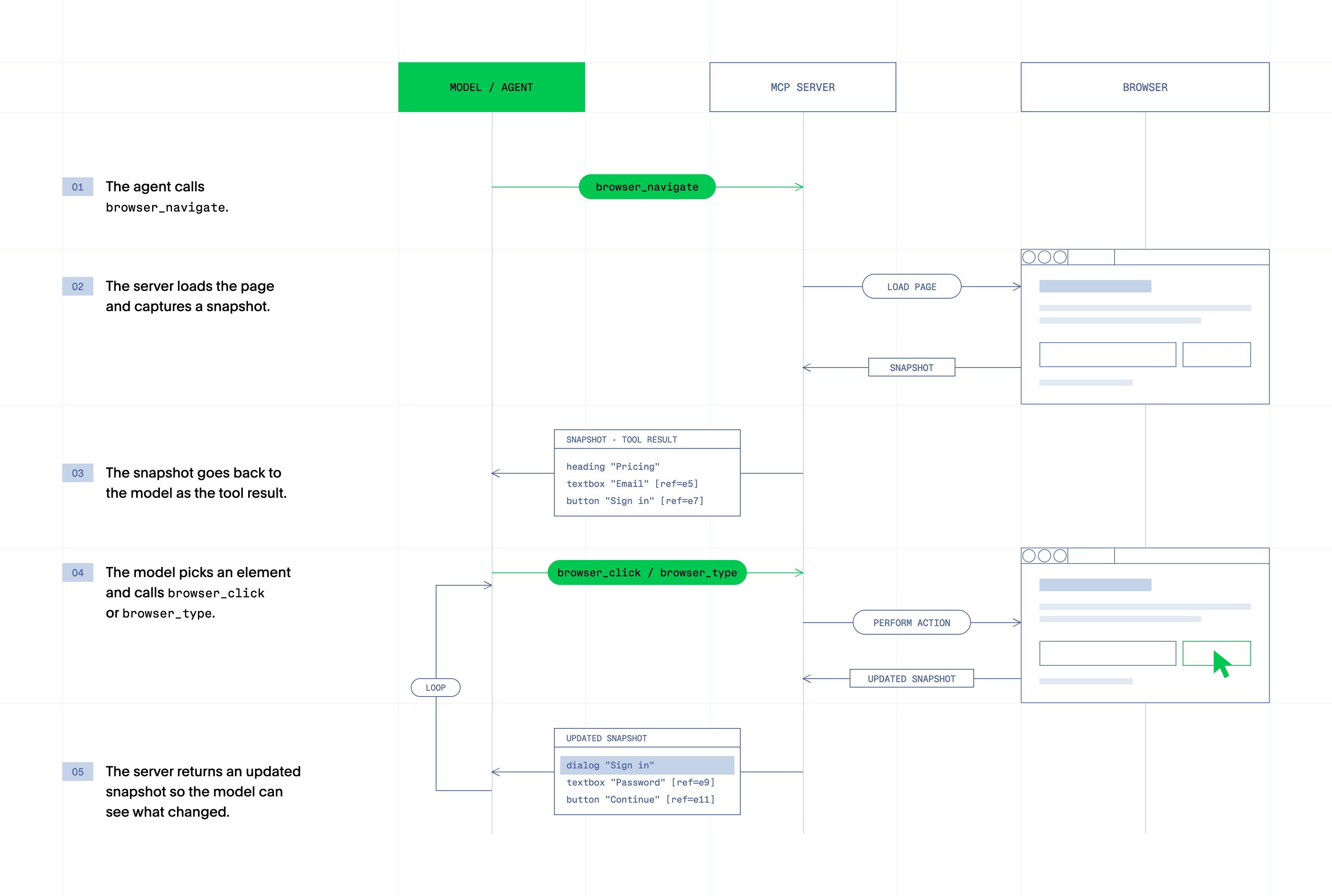
Steps 3 and 5 are the most token consuming, let's dive into the what makes them that greedy.
Where the tokens go#
Playwright MCP's snapshots architecture, while more efficient than screenshots, produces a compounding context window growth and token consumption for 4 main reasons:
1. Snapshot size: A simple login page produces a small snapshot while a dashboard, product listing, or docs page with navigation, footers, and hundreds of links produces a much larger one.
2. Snapshots after every action: Returning the updated page state after each click is what lets the model confirm its action worked. It also means a 15-step task can produce 15 snapshots. By default, Playwright MCP's snapshot mode for responses is set to full (README).
3. Accumulation: Old snapshots don't disappear, they stay in the conversation history, so by step 10 the model is carrying the state of pages it left long ago. This is the part developers notice: Reddit users described context being gone "after 2-3 navigations."
4. Tool schemas: Playwright MCP exposes 25 tools, accounting for 17,857 tool-definition chars added to the agent's context before any instruction is given.
Benchmark: tokens per page and per task#
Let's now talk numbers and see how much tokens Playwright MCP consume on tasks performed on real websites.
We evaluated Playwright MCP's token consumption on 8 websites composed of 4 public website and 4 local ones simulating more complex scenarios.
- Four on public sites:
- saucedemo.com: log in, add two items, read the checkout total.
- books.toscrape.com: the three cheapest books in a category that spans two pages.
- A four-hop Wikipedia navigation, following links only.
- One fact buried in a 670 KB Node.js docs page.
- Four on local test pages, built so they behave the same on every run:
- A form inside a cross-origin iframe.
- A button inside a closed Shadow DOM.
- A clickable icon with no role or accessible name.
- A 12-page form flow, used to measure how context grows page by page.
We benchmarked the token comsumption of Playwright MCP 0.0.82 with its default config, Playwright MCP tuned (--snapshot-mode none --codegen none, and the agent is told to use browser_find and browser_snapshot with depth) and Stagehand v4, through its Claude Code facade (run / snapshot / screenshot).
Each task ran 3 times per setup, in one randomized order, using Claude Sonnet 5 (*claude-sonnet-5 with thinking disabled*) and driven by the Claude Agent SDK 0.3.282.
| Setup | Tokens / task (median) | Cost / task (median) | Success rate | Time / task (median) |
|---|---|---|---|---|
| Playwright MCP (default) | 97k | $0.051 | 75% (18/24) | 31 s |
| Playwright MCP (tuned) | 105k | $0.051 | 88% (21/24) | 30 s |
| Stagehand (v4 facade) | 32k | $0.026 | 100% (24/24) | 18 s |
Over all 72 runs at list price with prompt caching, the totals were $2.16 (MCP default), $2.12 (MCP tuned) and $1.67 (Stagehand).
Interestingly, the “optimized” Playwright MCP configuration ended up consuming more tokens but better optimized for prompt caching, leading to similar cost per task.
Per step, Stagehand v4 sent smaller requests: a median of 6.9k input tokens per model call, against 12.9k–14.1k for Playwright MCP. On the 12-page flow, the picture flips per page. Stagehand's context grew about 1.8k tokens per step, because it re-reads the page after each form submission; MCP grew about 0.55k. But Stagehand batches several actions into one call, so it finished all 12 pages in 27 steps. Both MCP setups hit the 40-step limit in all three runs without finishing.
Why agents lose context#
An agent's context window contains all the history of the a ongoing conversation, which means: every token of reasoning, input and outputs tokens as well as tools schemas and their inputs and outputs. A context window naturally grows as the agent performs steps towards its goal.
Pruning the context, also called compaction, comes at a cost, invalidating the prompt cache offered by most LLM providers and therefore, drastically increasing the cost of new agent turns.
An heavy context comes with 2 major drawbacks: of course, cost (but mostly contained through prompt caching) and primarily accuracy. LLMs tend to gradually perform worse as the context grow, leading to hallucinations linked to the inability of the LLM to recall prior instructions.
Why agents miss elements on the page#
Accessibility elements are handwritten by humans and sometimes, completely missing or only partial. Therefore, solely relying on these ARIA attributes to construct your agent's vision of a webpage leads to missed elements, like a country road without signs.
While Playwright finds a way to counter this, 2 main technical challenges increases the blindness of agents on the web:
- Cross-origin iframes, common in payment forms, embedded widgets, and auth flows.
- Closed Shadow DOM. Playwright handles open shadow roots, but closed roots are designed to be inaccessible from outside the component.
How to reduce token usage with Playwright today#
Before switching tools, these options help:
Use Playwright CLI for coding agents. Microsoft now recommends it: the Playwright MCP README says coding agents "might benefit from using the CLI+SKILLS instead" (README, docs). The CLI keeps page state out of the model's context unless the agent asks for it. Install with npm install -g @playwright/cli@latest.
Tune Playwright MCP. Recent versions include options that cut context:
--snapshot-mode nonestops snapshots from being returned automatically after actions.browser_snapshotaccepts afilenameto save to disk instead of returning inline, and adepthto limit the tree.browser_findsearches the snapshot for specific text and returns only matching nodes.--mobileemulates a mobile device, which usually means lighter pages.--capscontrols which optional tool groups load, so leave off the ones you don't use.
Microsoft is explicit that MCP still has a place: for long-running autonomous workflows where maintaining continuous browser context outweighs token cost concerns. That's exactly the workload where the cost matters most.
What Stagehand does differently#
Stagehand is built for agents while keeping Playwright's interfaces (goto(), click(), locator, screenshot() and so on).
Stagehand is both optimized for speed and token-efficient execution:
Faster execution is achieved by running Stagehand's core architecture within the browser, as an automatically loaded extension. By doing so, each action gets computer and transmitted directly to the browser, without network in between. This brings up to a 50% faster execution in production deployments.
Token-efficient execution is achieved thanks to core features. First, Stagehand translate each pages to an hybrid accessibility snapshots tree that gives the model only meaningful elements and drop the unnecessary ones. Then, it offers 3 high-level APIs (observe(), act() and extract()) to enable the agent to prompt its way instead of navigating the whole tree. Finally, Stagehand's hybrid accessibility snapshots supports nested and cross-origin iframes as well as closed Shadow DOM.
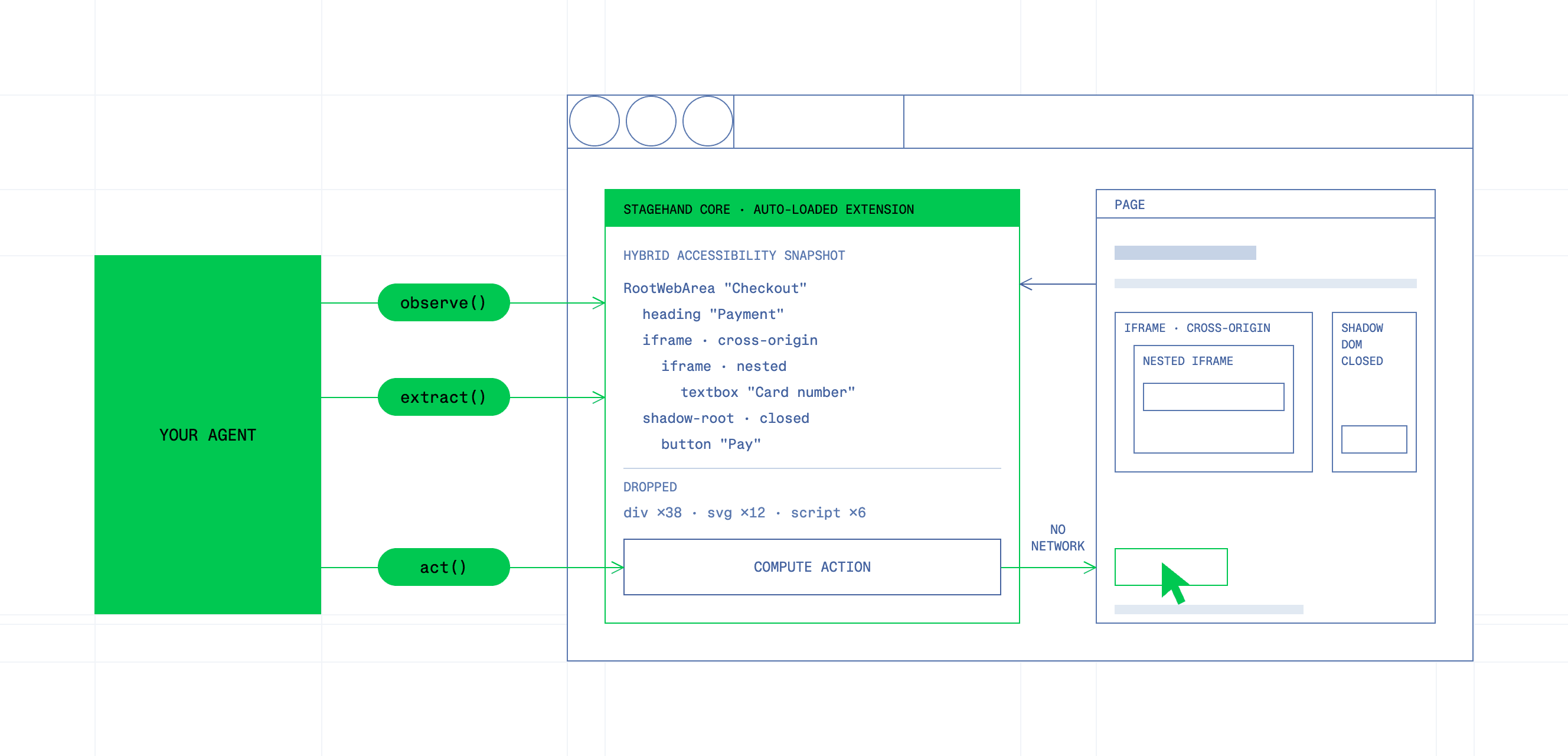
Stagehand's architecture results in 50% faster execution and 80% fewer tokens consumed than Playwright MCP.
When to keep using Playwright#
Use Playwright when there's no model in the loop: end-to-end tests, deterministic scripts, CI suites. Its runner, trace viewer, and parallelism are hard to beat, and nothing in this post argues otherwise. Use Playwright CLI when a coding agent needs a browser occasionally alongside a codebase. Reach for Stagehand when the agent itself runs the browser across many steps, on sites you don't control.
Getting started with Stagehand#
Stagehand's MCP server gives any MCP-compatible agent a persistent browser with three tools: run, snapshot, and screenshot. One server process owns the browser, so navigation, logins, and page state carry across tool calls.
Prerequisites
- Node.js 24 or newer
- pnpm 11.10.0
- Google Chrome, for local browser mode
- A Browserbase API key, for remote browsers (optional)
1. Clone and build
git clone https://github.com/browserbase/stagehand.git
cd stagehand
pnpm install --frozen-lockfile
pnpm exec turbo run build --filter @browserbasehq/stagehand-integrations
This builds the MCP server at:
packages/integrations/core/dist/facade/stdio-server.mjs2. Add it to your MCP client
For Cursor, Claude Desktop, and most MCP clients, add this to your MCP config, replacing the path with the absolute path to your checkout:
{
	"mcpServers": {
		"stagehand": {
			"command": "node",
			"args": ["/absolute/path/to/stagehand/packages/integrations/core/dist/facade/stdio-server.mjs"],
			"env": {
				"STAGEHAND_BROWSER": "local"
			}
		}
	}
}
For Claude Code:
claude mcp add stagehand -e STAGEHAND_BROWSER=local -- \
  node /absolute/path/to/stagehand/packages/integrations/core/dist/facade/stdio-server.mjs
For Codex, add to ~/.codex/config.toml:
[mcp_servers.stagehand]
	command = "node"
	args = ["/absolute/path/to/stagehand/packages/integrations/core/dist/facade/stdio-server.mjs"]
[mcp_servers.stagehand.env]
	STAGEHAND_BROWSER = "local"
3. Choose your browser
Local Chrome works for trying it out. For production, or any task on sites you don't control, switch to a remote Browserbase browser:
"env": {
	"STAGEHAND_BROWSER": "browserbase",
	"BROWSERBASE_API_KEY": "your-browserbase-api-key",
	"BROWSERBASE_PROJECT_ID": "your-project-id"
}
Some clients don't expand shell variables in config files, so paste the actual values.
4. Run a task
Ask your agent something like:
Open https://news.ycombinator.com and list the titles of the top five stories.
Frequently asked questions#
Does Playwright MCP use a lot of tokens?
It can on multi-step tasks, because every page the agent inspects stays in context. Since version 0.0.82, the default config no longer returns a snapshot after each action: it writes the snapshot to a file and returns a link, and the agent calls browser_snapshot when it needs to see the page. In our benchmark (Claude Sonnet 5, 8 tasks, 3 runs each), default Playwright MCP used a median of 97k tokens per task and 14k input tokens per model call. The token-saving options (--snapshot-mode none --codegen none, plus guidance to use browser_find) didn't reduce that: 105k per task, 12.9k per call. On a 12-page form flow, the default config's context grew from 7.8k to 28.7k tokens over 40 steps, and it hit the step limit before finishing, in all three runs.
Playwright MCP vs Playwright CLI: which uses fewer tokens?
Microsoft recommends the CLI for coding agents because it avoids loading tool schemas and accessibility trees into context. We measured the up-front cost only: Playwright MCP's 25 tool definitions come to 17.9k characters. The CLI setup sends 13.4k characters of tool definitions (Claude Code's Bash and Skill tools), and its 15.2k-character skill file loads into context when the agent first uses it. We haven't yet run full tasks through the CLI, so we don't have per-task numbers for it. MCP remains the fit for clients that can't run shell commands.
Why does my agent lose context during browser tasks?
Page state from earlier steps fills the context window. Clients then compact or drop earlier turns, and the agent loses track of the task. In our benchmark, with compaction disabled, context stayed well below the model's window: at most 66k tokens for Playwright MCP and 49k for Stagehand on the 12-page flow. The failures came from running out of steps, not context. Both Playwright MCP setups used all 40 allowed steps on that flow without finishing, while Stagehand, which can batch several actions into one call, finished it in 27.
Can Playwright handle Shadow DOM?
Playwright locators work with open shadow roots. Closed shadow roots are not accessible by design: in our test page, the button inside a closed root didn't appear in Playwright MCP's accessibility snapshot. Playwright MCP agents still completed the task in 6 of 6 runs, by writing their own code with browser_run_code_unsafe. They either read the DOM through the Chrome DevTools Protocol with shadow roots pierced, or patched attachShadow to force roots open and reloaded the page. Stagehand's snapshot includes closed shadow roots, and it completed the task in 3 of 3 runs.